Google has stamped an invisible marker into more than 100 billion AI-generated images and videos, and you have probably scrolled past a few of them today without noticing. It is called SynthID, and as of May 2026 it also rides inside pictures made by ChatGPT. A SynthID image watermark hides in the pixels themselves rather than in the file's metadata, which is why it survives the screenshot-crop-repost cycle that erases every other clue about where a picture came from. Most explainers stop there. The part they skip is how to read the result you get back, and that is where almost everyone goes wrong.
What a SynthID Image Watermark Actually Is
SynthID is a watermarking system built by Google DeepMind that marks content as AI-made without changing how it looks. It launched in 2023 for images from Imagen, and it now covers images, video, audio, and text across Google's AI products. The word "watermark" is doing unusual work here. There is no logo in the corner, no translucent text, nothing your eye can find at any zoom level. The signal lives in small, deliberate adjustments to pixel values, spread across the entire frame.
That design choice is the whole point. Traditional origin information sits in metadata, and metadata is fragile. Screenshot an image, upload it to a social platform, or re-save it in another format, and the metadata is usually gone. The pixels stay. So SynthID puts its evidence inside the picture instead of on a label attached to the file.
How Google Hides a Signal Inside the Pixels
Two neural networks do the work, and they are trained together. One embeds a pattern into the image while it is being generated, learning to hide it where human vision is worst at noticing change. The other learns to recover that pattern later, after the image has been through editing and compression. Because they improve against each other, the embedder gets better at hiding and the detector gets better at finding, which is how the signal ends up both invisible and durable.
Two details matter if you verify images for a living. First, the watermark goes in during generation rather than being bolted on afterwards, which is a large part of why it is hard to strip cleanly. Second, it is spread across the picture instead of parked in one corner, so a crop of a watermarked image usually still carries enough signal to be identified. The trade-off: this is a learned statistical pattern, not a cryptographic signature. It can indicate that AI made something. It cannot prove who made it, when, or with which model.
What the Watermark Survives, and What Wipes It Out
Google says the watermark is designed to hold up through cropping, added filters, color changes, resizing, and lossy compression, and to survive a screenshot. That covers nearly everything an ordinary person does to an image between seeing it and resharing it, which is exactly the design brief: the mark should still be there after the picture has been through the internet.
It is not indestructible, and Google has never said it was. DeepMind's own phrasing is that SynthID is not foolproof against extreme image manipulation. Independent researchers have found the same shape of result. Ordinary edits and random noise barely dent it, while attacks that rebuild the pixels from scratch, such as running the picture back through another AI model, are what actually break the signal. Anyone who tries usually pays for it in image quality.
There is a quieter failure mode that matters far more day to day. A watermark can cover only part of a picture. Photograph a real street, then use an AI editor to add a crowd, and only the generated region carries the mark. Google's detection tools account for this and can report that a portion of an image is AI-generated rather than the whole thing. That partial result is the one that trips people up, because they came looking for a yes or a no.
How to Check an Image for SynthID in Under a Minute
The everyday method is free and takes about thirty seconds. Open the Gemini app, upload the image, and ask whether it was created or edited by AI. Gemini looks for a SynthID watermark and reports what it finds, including whether only part of the image is marked. Google said at I/O 2026 that this check had already been run 50 million times worldwide, and that it is expanding the same capability into Search and Chrome, so the question can be asked where people already look at images.
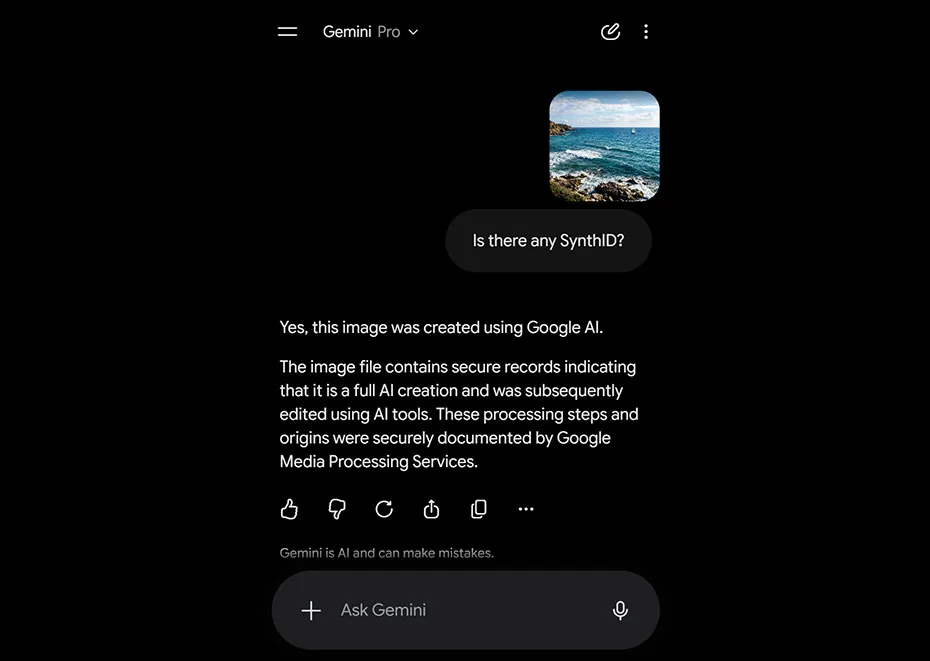
Two other routes exist, both with limits worth knowing. The SynthID Detector portal, the dedicated verification tool DeepMind announced in 2025, is still not open to the public; access runs through an early-tester waitlist aimed at journalists, media professionals, and researchers. OpenAI also has a verification preview of its own that checks for a SynthID watermark and content credentials, but only for images its own products created.
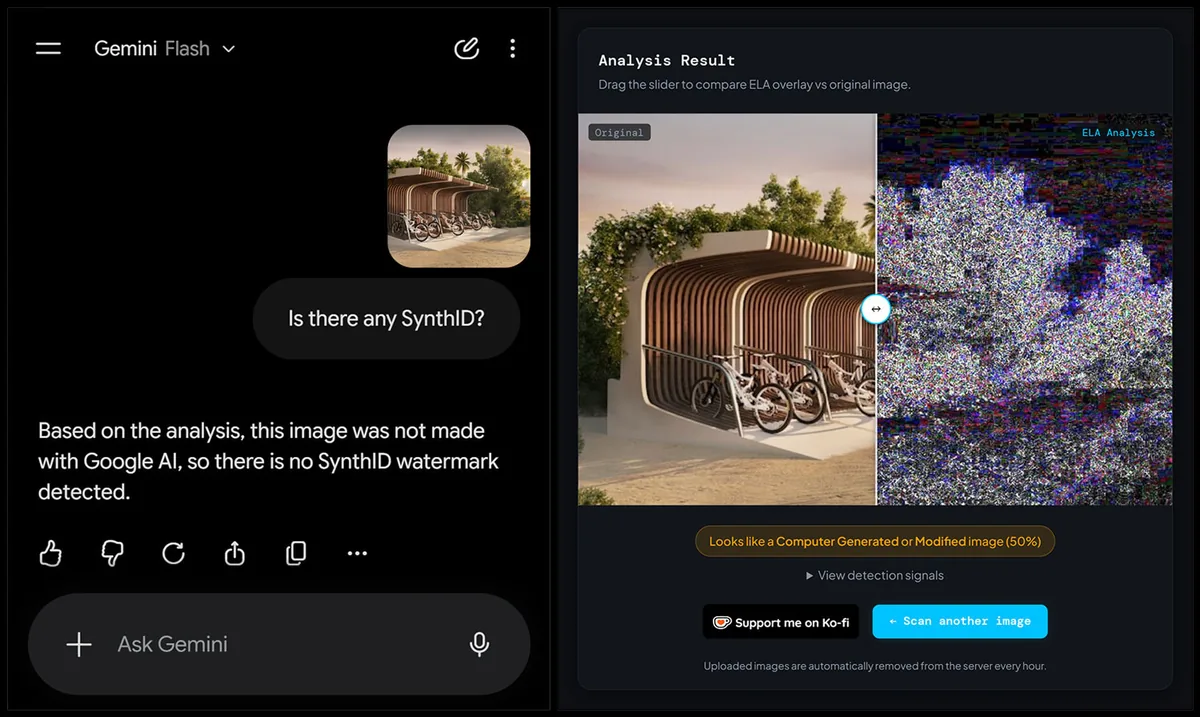
f you want a second opinion that does not depend on a watermark existing at all, that is where pixel forensics earns its keep. Run the same file through our free AI image detector and compare the two answers. Agreement raises your confidence quickly. Disagreement tells you exactly where to dig next.
The Mistake Almost Everyone Makes With a Clean Result
A common mistake I notice: someone runs a suspicious photo through a checker, sees "no watermark found," and treats it as proof the photo is real. It is not. It is proof that this specific image does not carry this specific watermark, which is a far smaller claim than it feels like.
Think about what would have to be true for a clean result to mean anything. The picture would have to have come from a generator that embeds SynthID in the first place, and it would have to have survived any processing harsh enough to degrade the signal. Neither is guaranteed. Anyone running an open-weight model on their own machine can produce an image with no watermark of any kind, and that is precisely the population you worry about when you are chasing a fake. Watermarking is a transparency system for cooperating tools. It was never a trap for uncooperative ones.
A SynthID hit tells you an image is synthetic. A miss tells you almost nothing at all.
Who Embeds SynthID Now, and Who Still Doesn't
For most of its life, SynthID was a Google-only feature marking output from Imagen, Gemini, and Veo. That changed at Google I/O 2026, when OpenAI, Nvidia, Kakao, and ElevenLabs were named as adopters. OpenAI's move is the one that reshapes detection work in practice: in May 2026 it began adding both a SynthID watermark and C2PA content credentials to images from ChatGPT, the OpenAI API, and Codex.
Now the gap. Midjourney, Stable Diffusion, FLUX, Grok, and the long tail of open-weight models running on people's own GPUs are not on that list, and neither is anything a determined bad actor can download and run offline. The coverage map comes down to this: the biggest commercial generators are increasingly marked, and everything else is not. That is real progress on accountability for mainstream tools, and close to zero progress on the images most likely to be used to deceive you.
SynthID and C2PA Answer Two Different Questions
You will see these two named together constantly, and they are not rivals. C2PA content credentials are signed metadata: a record of which device or tool made a file, when, and what edits followed. SynthID is a signal hidden in the pixels. The first carries rich detail and is easy to destroy. The second carries almost no detail and is hard to destroy.
Which is why the industry is stacking them rather than picking one. Screenshot a credentialed image and the metadata disappears, but a SynthID watermark rides along in the pixels. Keep the file intact and the credentials tell you a story no watermark could. Google now checks both in the Gemini app, and Pixel phones have started writing content credentials at the moment of capture, which builds the other half of the picture: evidence that a camera, not a model, produced the file.
Watermarks tell you a machine was involved. Content credentials tell you who was involved. Neither one tells you whether the picture is true.
Where SynthID Fits in a Real Verification Workflow
Treat SynthID as the cheapest signal to collect first, not as the verdict. When an image matters enough to check properly, this is the order I would work through.
Start with origin signals: ask Gemini for a SynthID check, and look at any content credentials attached to the file. If either confirms AI involvement, you are finished, and the image is generated or AI-edited. If nothing turns up, move on rather than concluding anything. Next, interrogate the file itself: metadata, resolution, compression history, and whether the picture has any documented life before the moment someone showed it to you. A reverse image search often ends the whole investigation by surfacing the original.
Then run a model-based detector that hunts for the statistical fingerprints of generation instead of a watermark, since that works whether or not the generator cooperated. Finally, weigh the context: who published it, what claim it supports, and whether anyone else recorded the same moment. Each step gives you a probability rather than a verdict, and stacking them is how you reach a confident answer.
Questions People Actually Ask About SynthID
Can a SynthID image watermark be removed?
Does a SynthID watermark mean the image is fake?
Can I detect SynthID without using Google's tools?
Does SynthID work on video, audio, and text too?
What to Do the Next Time an Image Looks Off
SynthID is the best invisible marker anyone has shipped at scale, and it now sits inside a large share of the AI images you will meet this year. It answers one question well: did a cooperating AI tool make this? It cannot answer the question you usually care about, which is whether the thing in the picture ever happened.
So build the habit instead of trusting the tool. Next time an image makes you pause, spend sixty seconds on it: ask Gemini whether it carries a watermark, then run the same file through our free AI image detector for a second opinion that does not depend on the generator having played along. Two signals, one minute, and a much better answer than a shrug.