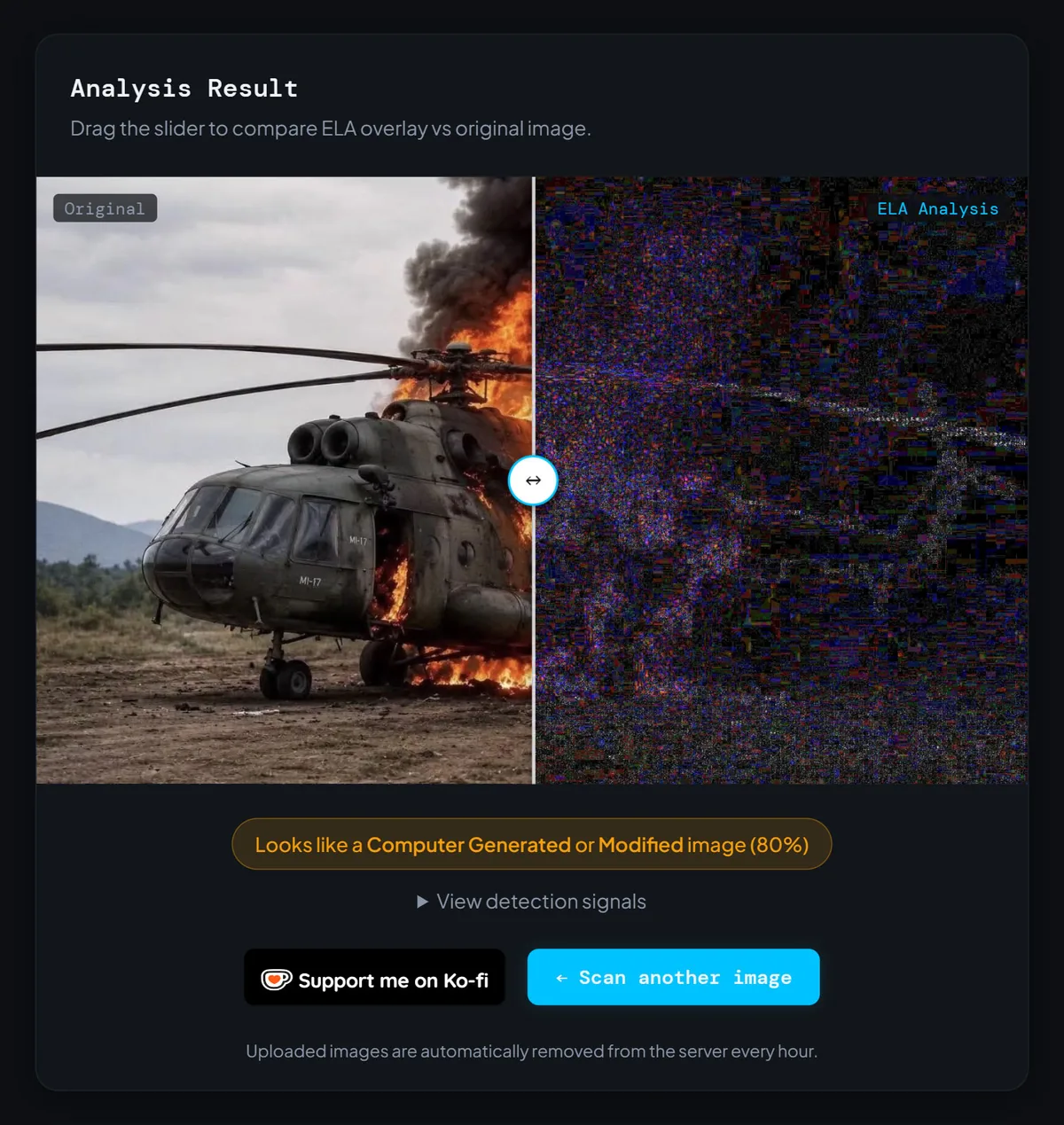
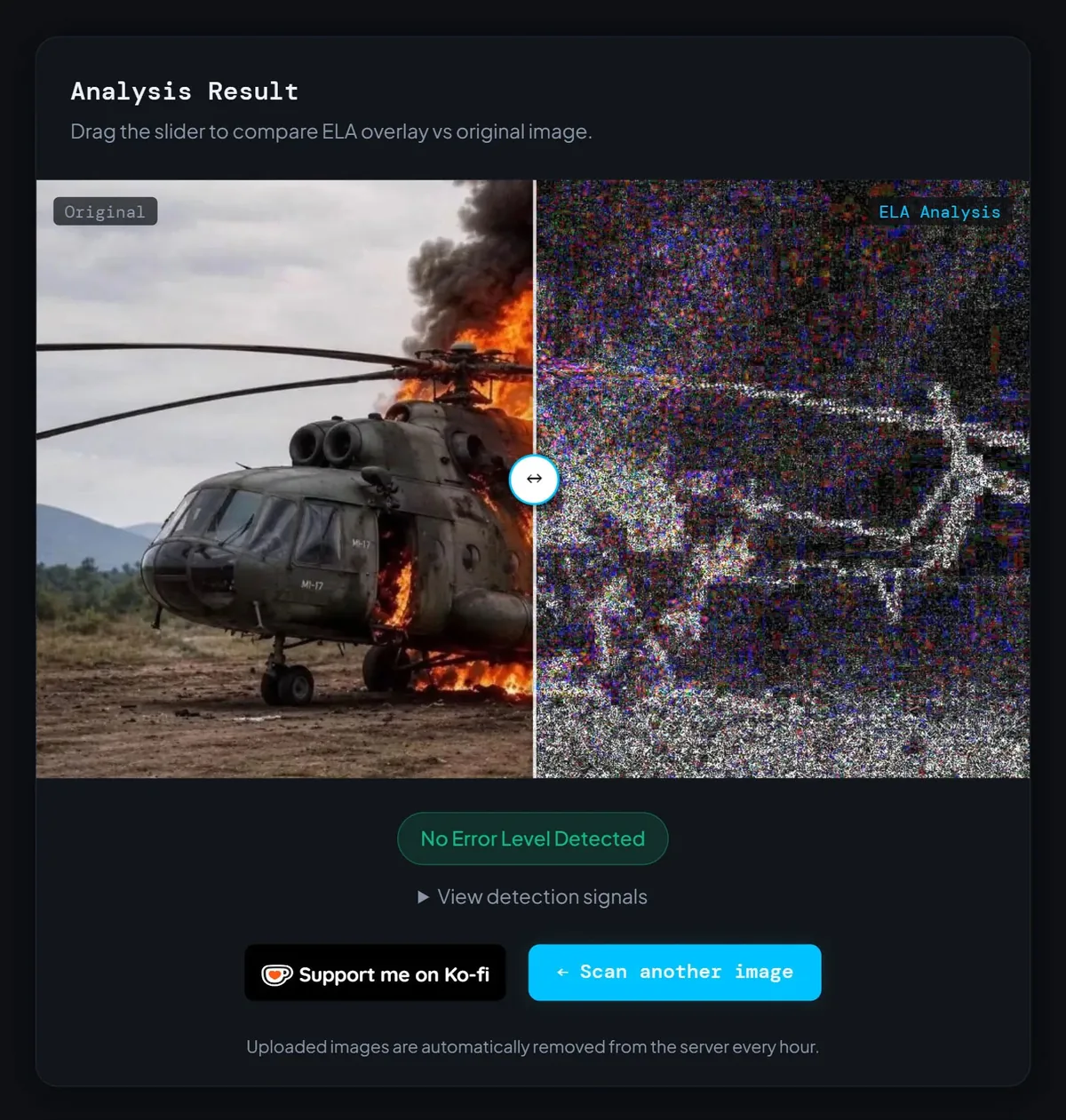
We ran the same fake photo through our detector twice and got two opposite verdicts. The first upload came back flagged as computer generated, 80% confidence. The second came back clean: no error level detected. Nothing about the picture changed. The second file was just a screenshot of the first. Screenshot vs original image is not a small technical footnote, it is the difference between a forensic tool doing its job and a forensic tool politely telling you nothing.
We Ran the Same Fake Photo Twice and Got Two Opposite Answers
The test image is one you may have already scrolled past. In June 2026, a photo of a Myanmar military Mi-17 helicopter engulfed in flames spread across Facebook, shared as evidence that rebel forces had shot down a chopper with a drone in Myaing township. AFP's fact-checkers debunked it. Real footage of the drone strike, published by Burmese media, showed a small fire under the aircraft, nothing close to the towering inferno in the viral picture. The image was AI-generated.
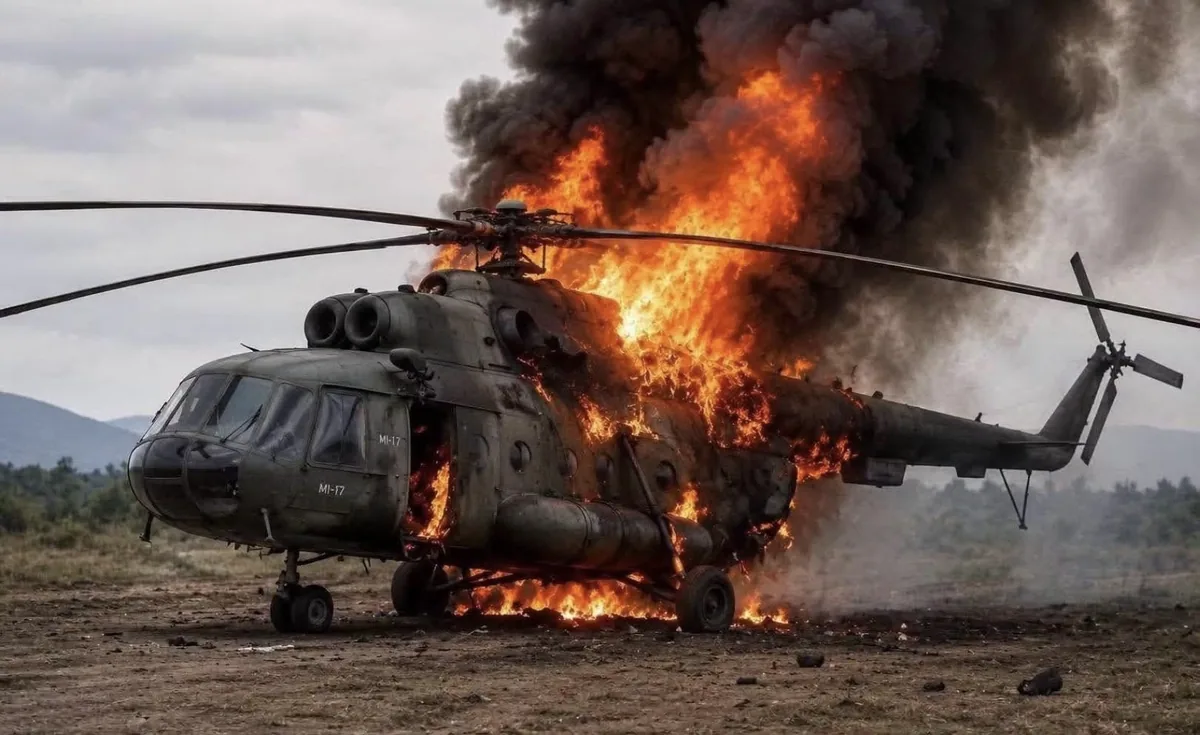
So we used it. We uploaded the circulating file to the detector on this site and it came back with a clear call: looks like a computer generated or modified image, 80% confidence. Then we did what most people actually do. We opened the same picture on screen, took a screenshot of it, and uploaded that instead. Same helicopter, same pixels, same fire. The verdict flipped to "No Error Level Detected."
This is not a quirk of one image or one tool. We have repeated it across 100+ AI-generated images and the pattern holds every time. The detector never got worse. It just got handed a different file and, quite reasonably, gave a different answer.
What a Screenshot Actually Does to an Image File
People think of a screenshot as a copy. It is not. It is a re-recording.
When you take one, your device decodes the image into raw pixels, hands those pixels to the display pipeline, scales them to fit your screen, composites them with everything else on the page, then captures the finished frame and encodes it into a completely new file. The picture that comes out looks identical to you. Structurally, it has almost nothing in common with the file that went in.
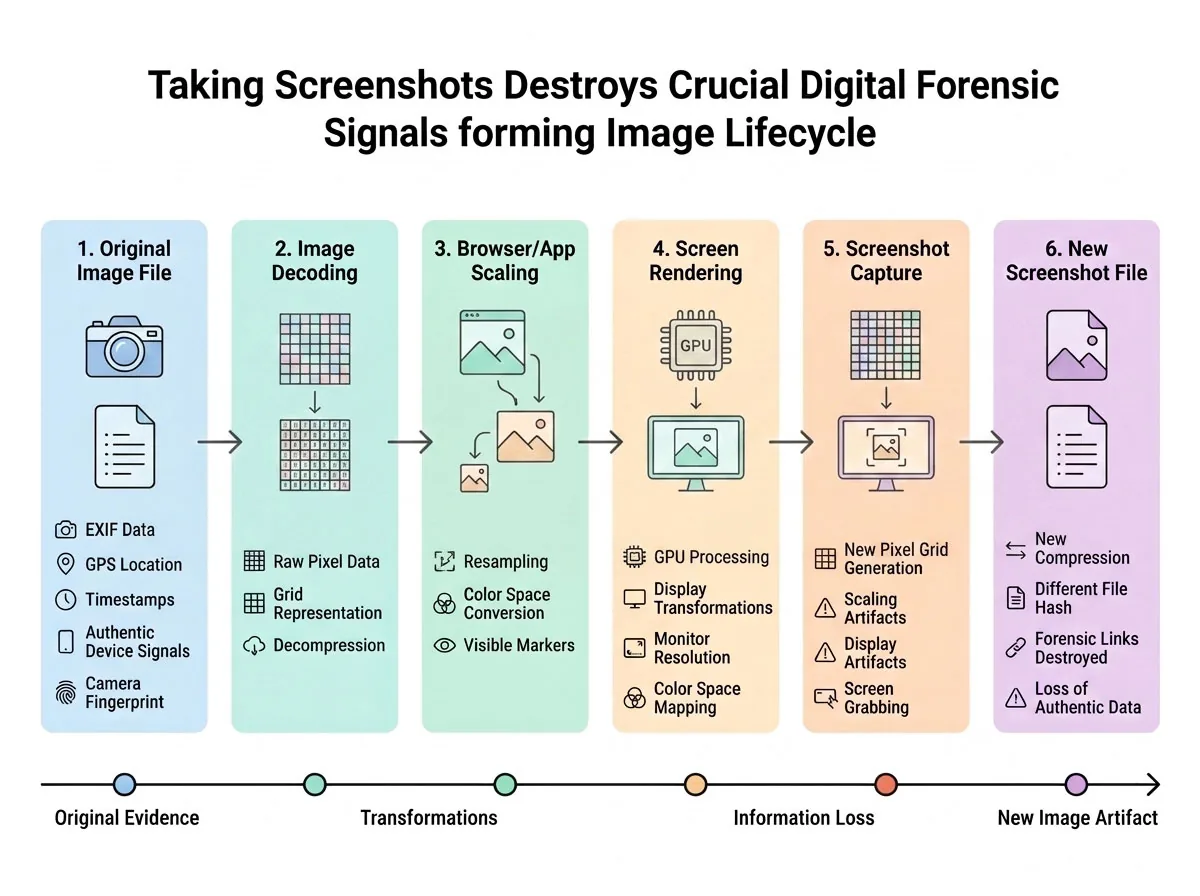
Three separate layers of evidence die in that pipeline, and forensic tools depend on all three. The compression history gets rewritten. The metadata gets replaced. The fine pixel statistics get smoothed over by rescaling. Let's take them one at a time, because each one fails in its own way.
Why Error Level Analysis Goes Blind on a Screenshot
Error Level Analysis works by re-saving your image as a JPEG at a fixed quality, then measuring how much each region of the picture changed in the process. The logic is simple. A photo that was saved once, all in one piece, should respond to that re-save fairly evenly across the frame. A photo with a pasted-in region, or an area that has been through extra save cycles, will not. Those regions light up.
Now look at what ELA needs in order to say anything at all: a file with a real compression history, and variation in that history from one region to the next. A screenshot has neither. Your operating system flattened everything into a single frame and encoded it in one pass, so every square inch of that file now shares an identical compression history. One save. One encoder. One moment in time. There is no variation left to find, because you erased it yourself before uploading.
The tool then does exactly what it was built to do. It hunts for uneven error levels, finds a perfectly even one, and reports precisely that. "No error level detected." The sentence is completely true. It just is not about the helicopter.
The moment you screenshot an image, you stop testing the picture and start testing your own screen.
The Metadata Is Not Hidden. It Is Gone.
Every image file carries a paper trail. EXIF records the camera, lens, timestamp and sometimes GPS coordinates. Software tags name the last program that touched it. C2PA Content Credentials, the signed provenance standard now attached by tools including ChatGPT, DALL-E and Adobe Firefly, record where a picture came from and what was done to it along the way.
A screenshot inherits none of that. Not a partial version, not a degraded version. None. The file you save is created fresh by your operating system, and the only metadata inside it describes you: your device, your screen dimensions, the second you pressed the keys. Content Credentials live in the file container rather than the pixels, so a screenshot leaves them behind completely.
Here is the part that stings. The file was probably already damaged before you ever touched it. Instagram, Facebook, X, TikTok, Reddit and LinkedIn all recompress uploads, and that recompression strips EXIF and C2PA manifests as a side effect. So the version circulating on your feed has usually lost its provenance data already. Screenshotting it just removes whatever scraps were left.
Screen Scaling Smears the Fingerprints Detectors Look For
This is the layer almost nobody accounts for, and it may be the most damaging of the three. You are very rarely looking at an image at its true pixel size. Your browser scales it to fit the column. Your phone or laptop renders at two or three times the logical resolution. Maybe you zoomed in a little to see the detail. At every one of those steps, the pixels on your screen are interpolated, averaged out of the original ones rather than copied from them.
That averaging acts like a gentle blur filter. Gentle enough that your eye notices nothing, and brutal on the high-frequency detail that detection models actually read: the repeating artifacts diffusion models leave in their output, the noise signature of a real camera sensor, the faint 8x8 grid that JPEG compression prints into every photo it touches. Resample the image and those patterns melt into the background.
Then you share the screenshot on WhatsApp and it gets compressed all over again. Every hop is another coat of paint over the fingerprints.
Screenshot vs Original Image: What Survives Each Hop
In practice this is not a two-way choice. There are usually three versions of any viral picture in circulation, and they are not equally testable.
The generator or camera original is the gold standard: intact compression history, intact metadata, whatever watermark and Content Credentials the source attached. Detectors work as designed on this file.
The platform copy, meaning the file you get by properly saving an image from a post, is degraded but still useful. Metadata is usually stripped and it has been recompressed once, but the pixel data stays close to the source and most detection signals survive. That is exactly what we tested at 80%, and it is worth saying plainly: even our flagged "original" was not a pristine generator file. It was a circulating copy, and it still carried enough signal to catch.
The screenshot sits at the bottom of the ladder. Compression history rewritten, metadata replaced with yours, pixel statistics resampled. It is a photograph of a photograph, and it tells you about the camera, not the subject.
If you want to feel this rather than read about it, it takes about a minute. Save an AI-generated image properly, screenshot the same image, and run both through the detector on this site back to back. Watching the confidence score collapse to nothing teaches the lesson better than any explanation I can write.
Why "No Error Level Detected" Is the Most Dangerous Result You Can Get
Of all the ways a forensic tool can let you down, this is the worst, because it fails in the direction of reassurance.
When a tool wrongly flags a real photo, you look again and you catch the mistake. When a tool clears a fake, you stop looking. And "no error level detected" reads, to almost everybody, as "this image is fine." It does not mean that. It means the file showed no internal inconsistency in error levels, which is true of every screenshot ever taken, of a real photo and a fabricated one alike.
A common mistake I see: someone screenshots a viral image, runs it through a checker, gets a clean pass, and posts the result as confirmation. Now the fake is travelling with a verification badge stapled to it, and the person who stapled it on there thought they were being careful.
How to Get the Original File Instead of a Screenshot
The fix is unglamorous and it works. Stop capturing your screen and start saving the file.
In a browser, right-click the image and choose "Open image in new tab" or "Save image as." That pulls the actual file down from the server rather than photographing your monitor. On X, open the image and load the direct media URL, then request the largest stored size; the platform keeps a bigger version than the one your timeline shows you. On Reddit, follow the i.redd.it link instead of the preview.
Messaging apps are where most people lose the file without realising it. WhatsApp and Telegram recompress anything sent as a photo. Ask the sender to resend it as a file instead: Telegram calls this "Send as file," WhatsApp calls it "Document." Same picture, no recompression, and often the original metadata comes along for the ride.
When the source is a dead end, work backwards. Run the picture through Google Lens, TinEye or Yandex and hunt for two things: the earliest posting and the largest file. The largest file is almost always the least damaged one available, and the earliest posting often leads straight to the account that made it.
What Still Works When a Screenshot Is All You Have
Sometimes the original is simply unavailable. The post was deleted, the sender only has a screenshot, the trail is cold. You are not helpless. You just have to stop asking questions about the file and start asking questions about the pixels, because those are the one thing a screenshot copies faithfully.
A screenshot destroys the file's history, but it copies the pixels honestly. So test the pixels.
Invisible watermarks are the strongest tool you have here. Google's SynthID embeds its marker inside the pixel values rather than the metadata, so a screenshot copies the watermark right along with everything else. It is built to survive compression, cropping, resizing and screen capture. This is precisely how AFP settled the helicopter image: they ran it through an AI verification tool, found an embedded SynthID watermark, and confirmed it came out of an AI generator. No compression forensics needed.
Then use your eyes, which is what the fact-checkers actually did first. AFP compared the viral picture against real drone-strike footage and found the fires did not match. Look closely at this specific image and there is another tell: the MI-17 designation appears twice on the nose, at two different sizes, in two different styles of lettering. Real aircraft markings do not work that way. Generative models are excellent at fire and smoke and terrible at consistent text.
Common Questions About Screenshots and Fake Image Detection
Does taking a screenshot remove every trace that an image was AI-generated?
Why did the detector say "No Error Level Detected" instead of just calling the image real?
Is a PNG screenshot better than a JPEG screenshot for analysis?
What if a screenshot is the only version I can find?
Test the File, Not a Photo of the File
The uncomfortable lesson from our test is not that the detector is weak. The detector did its job faithfully on both uploads. The problem is that the second upload was not the same evidence. We handed it a photograph of a screen and then asked it questions about a helicopter.
So here is your next step, and it costs you about thirty seconds. Next time an image lands in your feed and something feels slightly off, do not screenshot it. Right-click, save the actual file, and run that through the detector on this site. If the file is a dead end, reverse image search it and see whether a fact-checker has already been there before you. Getting the right file into the tool matters more than which tool you pick, and almost nobody does it.