Somewhere on your website there is probably a photo of a person who has never existed. That is not a scandal, it is arithmetic: stock libraries now hold millions of AI-generated assets, and the labeling meant to flag them runs largely on an honor system. Knowing how to tell if a stock photo is AI-generated used to be a party trick for image nerds. In 2026 it sits somewhere between brand risk and legal compliance, particularly if you advertise anywhere in Europe. The check itself takes about two minutes once you know what order to do it in.
An AI Stock Photo Is a Brand Risk, Not Just a Taste Problem
The cost of an AI stock image is rarely that it looks bad. It is that you cannot prove where it came from, and four separate problems grow out of that gap: audience trust, ownership, releases, and disclosure.
Ownership is the one that surprises people. In the United States, purely AI-generated output cannot be registered for copyright, a position the Copyright Office has held since 2023 and that the courts have upheld in Thaler v. Perlmutter. So the arresting "photograph" anchoring your homepage may be an asset nobody owns, which means your closest competitor can license the identical file and run it next week.
Then there are releases. A synthetic person has no model release, and if the output happens to resemble a real one, you have a publicity-rights problem you never signed up for. Adobe Stock makes contributors flag AI content that features fictional people for exactly this reason. The risk sharpens by sector: healthcare, financial services, recruitment, education, and any page that implies "this is our team" or "this is our customer."
The question worth asking is not whether the photo looks fake. It is whether you can prove where it came from.
Check the License Page Before You Check the Pixels
The fastest tell is almost never in the image. It is on the listing page you scrolled past on your way to the download button. Every major library now takes a position on AI content, and those positions differ enough that "I got it from a paid library" tells you very little on its own.
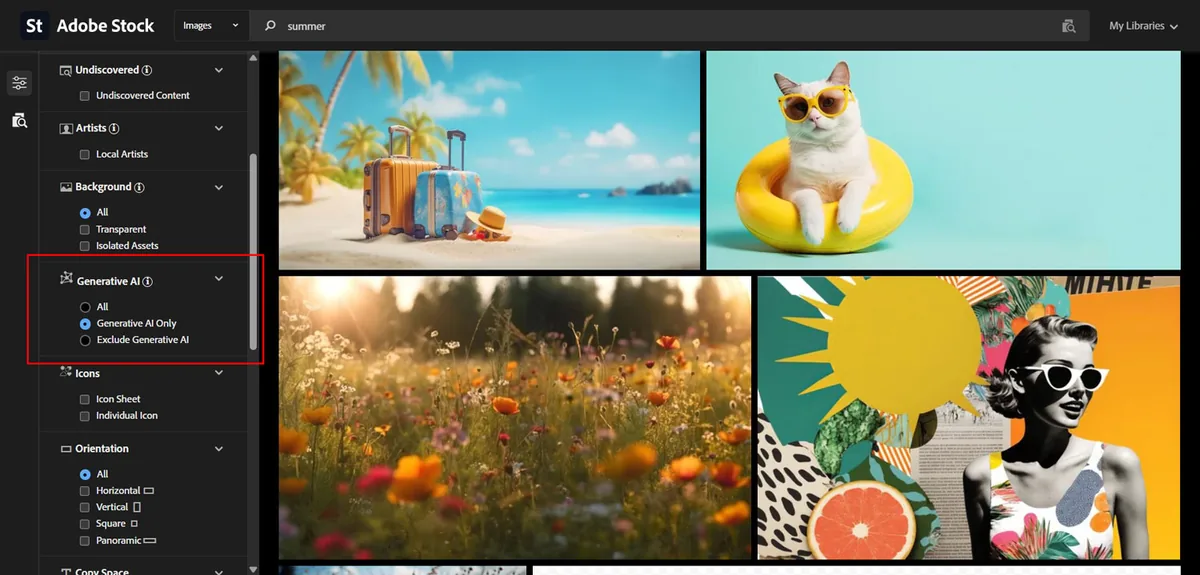
Adobe Stock accepts AI content as long as contributors tick the "Created using generative AI tools" box before submitting, plus a second box when the people or property shown are fictional. That declaration feeds the site's generative AI filter. The weakness is obvious once you say it out loud: it is self-reported, and reporting going back to 2025 has turned up unlabeled AI images sitting in the regular collection.
Shutterstock and Getty Images took the opposite route. Neither accepts AI-generated submissions from contributors, but both sell output from their own licensed generators, complete with indemnification. So a Getty asset can still be synthetic; it just came from a different door. Free libraries are where I see brands get caught most often, because labeling on those platforms is patchy and enforcement is thin.
A habit worth building: when you license anything for a campaign, save the license page as a PDF alongside the file. It takes five seconds and it is the only record that exists of what the library told you at the moment you downloaded.
Read the Metadata: The Fastest Tell You Have
Metadata is the closest thing to a receipt an image can carry, and in 2026 the receipts are usually there. Three fields do most of the work, and you can read all three in one pass.
Look first for a C2PA manifest, the Content Credentials standard maintained by the Coalition for Content Provenance and Authenticity. It is cryptographically signed, so it cannot be quietly edited, only removed. Then check the IPTC digital source type: a value of trainedAlgorithmicMedia means fully machine-generated, while compositedWithTrainedAlgorithmicMedia means real pixels mixed with generated ones. Finally, read the plain EXIF Software field, which often names the generator outright.
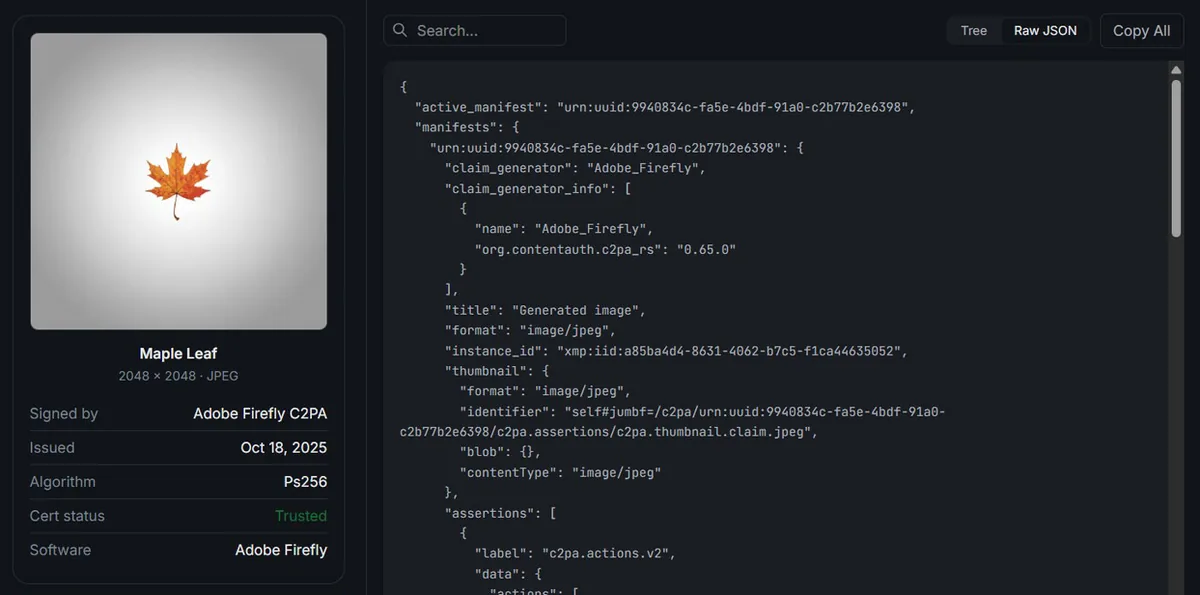
This is now default behavior rather than a nice-to-have. OpenAI's image tools, Adobe Firefly, Google's Imagen and Gemini generators, and Midjourney all embed provenance markers automatically. If any of those signals is present, you are done; the image is synthetic and no further investigation is needed.
Why "No EXIF Data" Does Not Mean AI, Especially With Stock
This is the single most common mistake I notice, and generic detection guides keep repeating it. They tell you that missing camera data proves a machine made the image. For stock photos specifically, that reasoning falls apart immediately.
Libraries strip and rewrite metadata as part of delivery. What you get in the download is usually the library's own IPTC block (credit line, licensor, asset ID) rather than the shutter speed and lens the photographer actually used. Your CMS then resizes the file and drops whatever survived. Treat metadata as a one-way signal: its presence is close to conclusive, its absence proves nothing at all.
The Visual Tells That Still Work in 2026, and the Ones That Don't
Stop counting fingers. Hands, teeth, and glossy skin were the giveaways of 2023, and current models have largely fixed them. Advice built on those tells now produces the worst outcome available, which is confidently accusing a real photographer of faking their work because their retouching looked clean.
What still holds up, roughly in order of reliability:
Background typography. Signage, name badges, book spines, keyboard keys, packaging copy. Text away from the focal point is still where generation breaks down first.
Reflections and shadows. Mirrors, spectacles, shop windows, polished tables. Check whether the reflection agrees with the scene and whether every shadow points at the same light source.
Repetition. The same face twice in a crowd, or foliage and fabric that tile like wallpaper when you look at 100% zoom.
Objects that could not function. Scissors hinged in the wrong place, a cable running to nowhere, a chair with a missing leg behind a table, watch hands showing an impossible time.
Regional details. Plug sockets, road markings, license plates, uniform insignia, keyboard layouts. For UK, Australian, and European campaigns this one catches a surprising amount, since models default to American norms.
Researchers at Northwestern's Kellogg School grouped these giveaways into five families: anatomical implausibilities, stylistic artifacts, functional implausibilities, violations of physics, and sociocultural implausibilities. That framing is useful because it stops you fixating on faces and pushes your eye toward the edges of the frame, which is where the evidence usually lives.
One tell that is specific to stock and that almost nobody mentions: look at the contributor, not just the image. If a single account has uploaded several thousand assets across thirty unrelated subjects in six months, that portfolio was not shot on location. It is a supply-chain signal rather than a pixel signal, and it takes ten seconds to check.
Run It Through a Detector, Then Read the Score Properly
A detector is a second opinion, not a verdict. These tools return a probability that an image is synthetic, and even the vendors publishing the strongest benchmark results say plainly that no detector is fully reliable and that scores should be paired with human judgment.
Two habits improve your results more than switching tools ever will. Test the largest file you are licensed to hold, never a screenshot or a web-resized copy, because every re-compression strips signal the detector depends on. And when the stakes are high, run a second tool: agreement between two independent methods is worth far more than a single confident number.
If you want the metadata read and the pixel-level analysis in one pass, that is what Fake Image Detector does. You upload a JPG, and it returns Error Level Analysis alongside a metadata breakdown in a few seconds, which is usually enough to close the question on a single asset before it reaches a designer.
Where Error Level Analysis Helps and Where It Falls Flat
Time for the unglamorous part, because tools that oversell themselves cost you more than tools that admit their limits. Error Level Analysis resaves a JPEG at a known quality and maps where the file responds differently. Regions with a different compression history light up, which makes it very good at spotting things that were added to a real photograph.
So ELA catches a face swapped in, a logo painted out, a sky replaced, a background extended to fit a 16:9 crop. What it does not do is flag a clean, single-pass AI generation, because that file has one uniform compression history from edge to edge. A quiet ELA map is not a clean bill of health, and anyone telling you otherwise is selling something.
For stock work, that limitation matters less than you would think. A large share of questionable stock imagery is hybrid rather than fully synthetic: a real photo with generative fill used to widen the frame, remove a trademark, or drop in an extra person. Those hybrids are exactly what ELA reads best, and exactly what pure AI detectors tend to score as "real" because most of the pixels are.
Detection tools tell you what an image probably is. Provenance tells you what it actually is.
What Regulators in the EU, UK, and US Now Expect From Brands
Disclosure is moving from etiquette to obligation, and the timeline is short. The transparency rules in Article 50 of the EU AI Act apply from 2 August 2026. They require providers of generative systems to mark synthetic outputs in machine-readable form, and they require organizations deploying that content to disclose material that convincingly resembles real people, places or events. Marking duties for systems already on the market before that date were pushed back to December 2026 under a provisional agreement between the Council and Parliament.
The UK, US, Australia, New Zealand and Canada have not written AI-specific image rules, but they did not need to. Advertising that materially misleads is already prohibited under the CAP Code in the UK, under the FTC's deception standards in the US, and under consumer law prohibitions on misleading conduct across the other three. A synthetic image implying a real customer, a real result, or a real product sits inside those existing rules today.
None of this is legal advice, and a lawyer in your market should sign off on your policy. The practical takeaway is contractual: write into your agency and freelancer agreements who is responsible for checking image provenance and who applies any required label. That ambiguity is where problems compound.
How to Tell if a Stock Photo Is AI-Generated in Under Two Minutes
Order matters more than effort here. Run the cheap checks first, and most images resolve before you get to step four.
Open the license page and look for a generative AI label plus any fictional-people flag.
Download the largest file your license allows. Never test a screenshot.
Read the metadata for a C2PA manifest, an IPTC digital source type, or a generator name in the Software field. Positive result means stop.
If the metadata is clean, view at 100% and scan the edges: background text, reflections, shadow directions, repeated faces, region-specific details.
Run a detector and an ELA pass on the original file, then weigh the two together.
Record what you found next to the asset in your DAM, with the date and who checked it.
Questions Brands Keep Asking About AI Stock Photos
Can I just look at an image and tell?
Is it illegal to use an AI-generated stock photo?
Do AI detectors work on files downloaded from stock libraries?
Should we label AI images we use on our own site?
Wrapping Up: Start With What You Have Already Published
New images are the easy part, because you can build the check into your workflow tomorrow. The harder question is what is already live, licensed years ago under looser labeling rules and quietly anchoring your highest-traffic pages.
Do this today. Pull the ten images doing the most work on your site: homepage hero, top three landing pages, about page, and anything showing a person who appears to be a customer or an employee. Run each one through Fake Image Detector for the metadata read and the ELA pass, then note the result in a shared sheet.
Three out of the ten images were flagged, mostly because the metadata had been stripped during editing, even though the images themselves were legitimate.
Most teams find the audit takes under half an hour and turns up one or two surprises. That is a small price for knowing exactly what is on your own website, which is a claim fewer brands can make than you might expect.